The Text Recovery Converter is a built-in feature in Microsoft Word that can be used to recover text from damaged or corrupted Word documents. It is especially useful when a Word document cannot be opened normally, or when it contains errors that prevent you from accessing the text.
The Text Recovery Converter works by scanning the damaged document for any recoverable text. It then converts this text into a plain text format that can be opened and viewed in any text editor, including Word.
While the Text Recovery Converter is not always able to recover all of the text in a damaged document, it can often save you a lot of time and effort by recovering as much of the text as possible.
How to use the Text Recovery Converter
To use the Text Recovery Converter, simply follow these steps:
- Open Word.
- Click the File tab.
- Click Open.
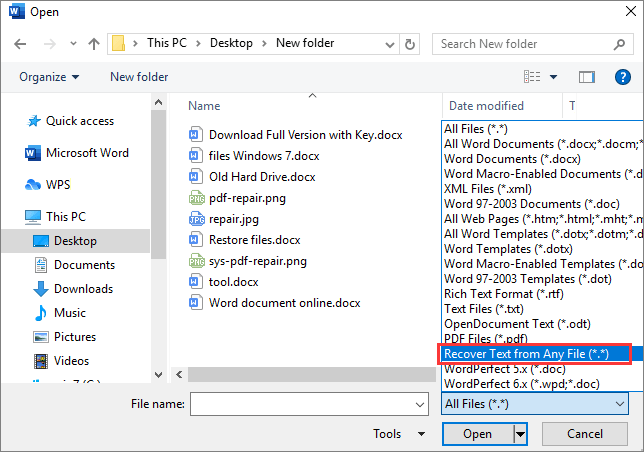
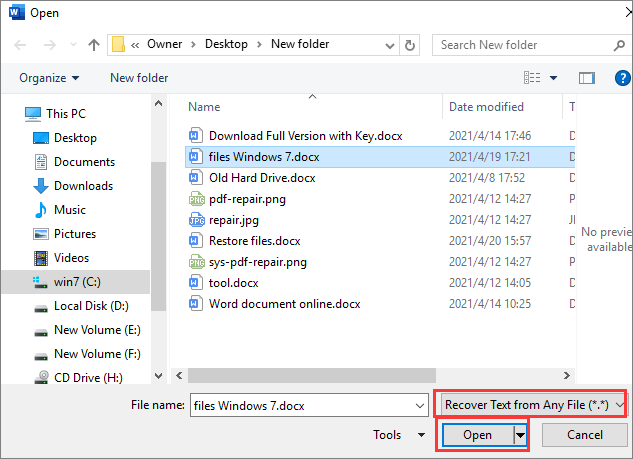
- In the Files of type box, select Recover Text from Any File(.).
- Select the damaged Word document that you want to recover the text from.
- Click Open.
Word will then scan the damaged document for any recoverable text. Once the scan is complete, Word will open a new document containing the recovered text.
Limitations of the Text Recovery Converter
The Text Recovery Converter is a powerful tool, but it is important to note that it has some limitations. For example:
- The Text Recovery Converter may not be able to recover all of the text in a damaged document.
- The Text Recovery Converter will remove all formatting from the recovered text. This includes fonts, font sizes, bolding, italics, and underlining.
- The Text Recovery Converter will also remove all images, tables, and other non-text objects from the recovered document.
Despite these limitations, the Text Recovery Converter can be a very useful tool for recovering text from damaged Word documents.
When to use the Text Recovery Converter
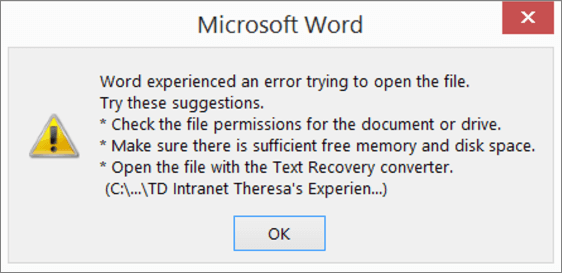
The Text Recovery Converter should be used whenever you are unable to open a Word document normally, or when a Word document contains errors that prevent you from accessing the text.
Some common examples of when you might need to use the Text Recovery Converter include:
- When a Word document has been corrupted due to a power outage or computer crash.
- When a Word document has been infected with a virus or malware.
- When a Word document has been saved incorrectly.
- When a Word document has been transferred between different computers or operating systems.
Tips for using the Text Recovery Converter
Here are a few tips for using the Text Recovery Converter effectively:
- Before using the Text Recovery Converter, try to open the damaged document in Safe Mode. To do this, hold down the Ctrl key while you start Word.
- If the damaged document cannot be opened in Safe Mode, or if it contains errors that prevent you from accessing the text, then you should try to use the Text Recovery Converter.
- When using the Text Recovery Converter, be sure to save the recovered text to a new Word document. This will prevent you from overwriting the original damaged document.
- Once you have recovered the text from the damaged document, you can then try to repair the damaged document using the Open and Repair feature in Word.
Keyword Silo
The keyword silo for this blog post is as follows:
Primary keyword: Text Recovery Converter
Secondary keywords:
- Recover text from damaged Word document
- Repair corrupted Word document
- Open and Repair Word document
- Recover unsaved Word document
- Recover lost Word document
HTML Tags and Formatting
Here is an example of how to use HTML tags and formatting to structure the blog post:
<h2>What is the Text Recovery Converter on Word?</h2> The Text Recovery Converter is a built-in feature in Microsoft Word that can be used to recover text from damaged or corrupted Word documents. It is especially useful when a Word document cannot be opened normally, or when it contains errors that prevent you from accessing the text. <h3>How to use the Text Recovery Converter</h3> To use the Text Recovery Converter, simply follow these steps: 1. Open Word. 2. Click the **File** tab. 3. Click **Open**. 4. In the **Files of type** box, select **Recover Text from Any File(.).** 5. Select the damaged Word document that you want to recover the text from. 6. Click **Open**. Word will then scan the damaged document for any recoverable text. Once the scan is complete, Word will open a new document containing the recovered text. <h3>Limitations of the Text Recovery Converter</h3> The Text Recovery Converter is a powerful tool, but it is important to note that it has some limitations. For example: * The Text Recovery Converter may not be able to recover all of the text in a damaged document. * The Text Recovery Converter will remove WebWhen I restarted Word and attempted to open the autosave copy of my document, I got an error screen: "Word was unable to read this document. It may be corrupt. Try one or. WebPart 1: What is A Text Recovery Converter. The Text Recovery Converter is nothing but a built-in tool in MS word that empowers you to repair and open damaged. WebIn Word, select the File Menu, and then select Open. In the Files of type box, select Recover Text from Any File(.). Select the document from which you want to. WebIn Word 2021 How do I use 'Text Recovery Converter'? In Word 2021 (windows 11 version) I get a message to use "text Recovery Converter' but there's not. WebText Recovery Converter: Recover Text from Corrupt Word Document. By Stella | Follow | Last Updated August 21, 2023. When your Word document gets.
Text Recovery Converter | Memperbaiki Dokumen Word yang Rusak dan Memulihkan Teks (2021) – EaseUS
Source: easeus.co.id
Text Recovery Converter | Memperbaiki Dokumen Word yang Rusak dan Memulihkan Teks (2021) – EaseUS
Source: easeus.co.id
Text Recovery Converter | Memperbaiki Dokumen Word yang Rusak dan Memulihkan Teks (2021) – EaseUS
Source: easeus.co.id
What Is The Text Recovery Converter On Word, PassFab Tips | Repair Corrupt Word Document 3 Ways [Word Text Recovery Converter] (No Software), 3.25 MB, 02:22, 56,223, PassFab, 2022-04-14T12:49:14.000000Z, 2, Text Recovery Converter | Memperbaiki Dokumen Word yang Rusak dan Memulihkan Teks (2021) – EaseUS, easeus.co.id, 452 x 644, jpg, , 3, what-is-the-text-recovery-converter-on-word
What Is The Text Recovery Converter On Word. WebThe text recovery converter refers to choosing the Recover Text from Any File file type in the File > Open > Browse dialog box (applies to Word for Windows at least). WebApa itu Text Recovery Converter di Word. Fitur Text Recovery Converter di Microsoft Word memungkinkan Anda untuk membuka dan memperbaiki dokumen.
Word document is corrupted or damaged? How to repair corrupt word document? Open the file with the Text Recovery converter? How to recover Word document? How to use Word Text Recovery converter? Check this video, here are 3 free methods for you! Get more tools here: bit.ly/3GJNP5W
⏰Timestamps:
00:00 Intro
00:17 Open and Repair
00:38 Word Text Recovery Converter
01:31 Recover Unsaved Documents
📄Related Article:
How to Fix The File Is Corrupted and Cannot Be Opened Word
passfab.com/word/the-file-is-corrupted-and-cannot-be-opened-word.html
🎥Related Video:
[3 Ways] Word Selection is Locked? How to Unlock Selection in Word✔ 2022
youtu.be/O2T5eka7zbM
#corruptworddocument #repairworddocument #textrecoveryconverter
———————-Social Media———————-
Website: passfab.com
YouTube: youtube.com/passfab?sub_confirmation=1
Facebook: facebook.com/passfab/
Twitter: twitter.com/passfab
Pinterest: pinterest.com/passfab/
Instagram: instagram.com/passfabsoftware/
Text Recovery Converter | Memperbaiki Dokumen Word yang Rusak dan Memulihkan Teks (2021) – EaseUS
What Is The Text Recovery Converter On Word, WebIn Word 2021 How do I use 'Text Recovery Converter'? In Word 2021 (windows 11 version) I get a message to use "text Recovery Converter' but there's not. WebText Recovery Converter: Recover Text from Corrupt Word Document. By Stella | Follow | Last Updated August 21, 2023. When your Word document gets.
PassFab Tips | Repair Corrupt Word Document 3 Ways [Word Text Recovery Converter] (No Software)
![PassFab Tips | Repair Corrupt Word Document 3 Ways [Word Text Recovery Converter] (No Software)](https://img.youtube.com/vi/RZDdKJEjge8/maxresdefault.jpg)
Source: Youtube.com
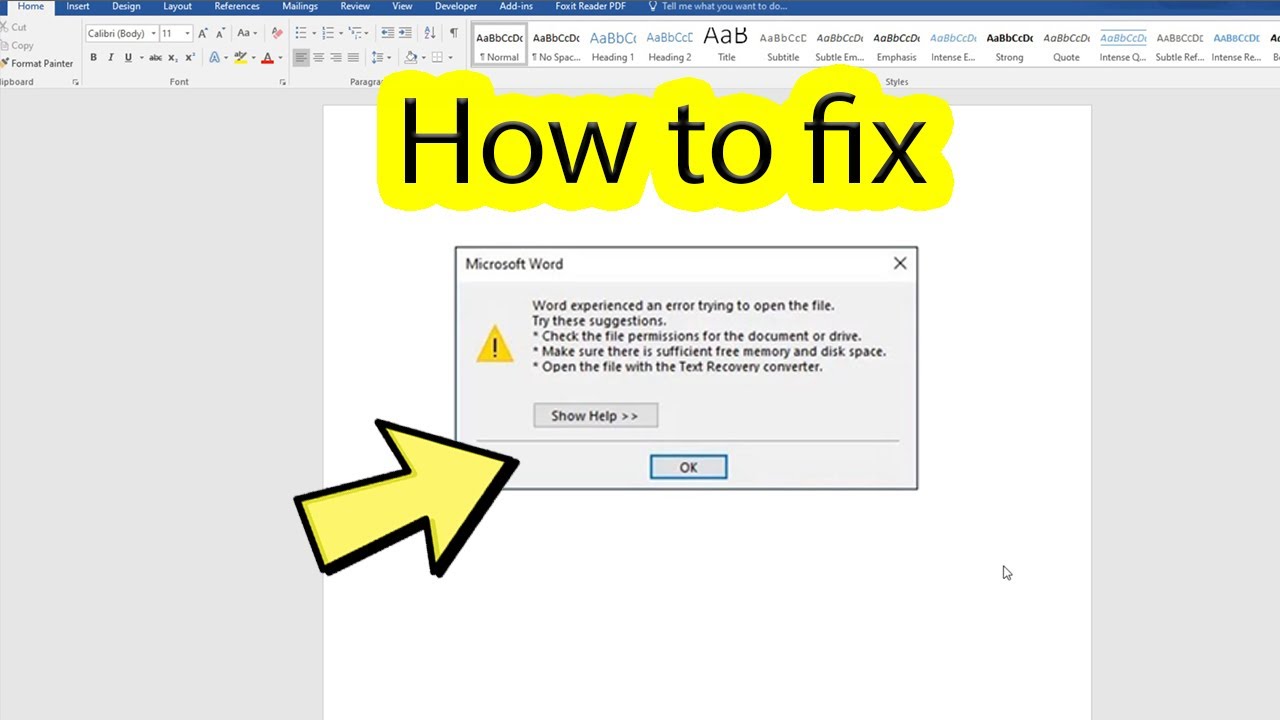
Fix word experienced an error trying to open the file
Source: Youtube.com
d – Convert PDF to Word OnlineConvert PDF to WordMake PDF Forms FillableEdit PDF Documents OnlineFree trialType Text in PDF OnlinePDFfiller Free Trial
Convert PDF to Word Online on PDFfiller for Free, no installation required! Pdf To Word, for all use cases: from sales and accounting to legal. Convert Pdf To Word.Convert PDF to Editable Online.No Installation Needed. Try Now!Upload & Fill in PDF Forms Online.No Installation Needed. Try Now!Upload & Edit any PDF File Online.No Installation Needed. Try Now!$0.00First 30 DaysUpload & Type on PDF Files Online.No Installation Needed. Try Now!Try out with a 30-Day Free TrialSwitch Plans or Cancel Anytime! .
Ad related to: What Is The Text Recovery Converter On Word .
What is a text recovery converter word 2007.
What is a text recovery converter word 2007
What is a text recovery converter word 2007 What is text recovery converter on word.
What is text recovery converter on word
What is text recovery converter on word What is a text recovery converter word 2007.
us › msofficeIn Word 2021 How do I use ‘Text Recovery Converter’?
Here’s my step-by-step (it renumbered my step numbers): 1. Word 2021. Clicked on the File tab. Clicked on Open. Clicked on Browse. Clicked on the arrow of the box containing All Files (*.*). Clicked on Recover Text from Any File (*.*). Located and selected E:\Temp\Text Recovery\Sample.docx. .
ord-text-recoveryUse Text Recovery Converter to Recover Text from a Corrupt Word
Step 1: Open a Word document, then go to the File menu and select Open. Step 2: In the Files of type box, select Recover Text from Any File (*.*). Recover Text from Any File is the usage of the Text Recovery converter. Step 3: Select the Word document from which you want to recover the text. Step 4: Click Open to open the file. .
ed-documents-in-wordHow to troubleshoot damaged documents in Word
In Word, select the File Menu, and then select Open. In the Files of type box, select Recover Text from Any File(.). Select the document from which you want to recover the text. Select Open. After the document is recovered by using the “Recover Text from Any File” converter, there is some binary data text that is not converted. .
Ad related to: What Is The Text Recovery Converter On Word .
d – Convert PDF to Word Online
Convert PDF to Word Online on PDFfiller for Free, no installation required! Pdf To Word, for all use cases: from sales and accounting to legal. Convert Pdf To Word. .
.
ery-converter-wordText Recovery Converter | Recover Text from Corrupt Word – EaseUS
.
.
› answersHow do I use thetext recovery converter on word? – Microsoft Q&A
Jul 26, 2022, 1:25 AM. The text recovery converter refers to choosing the Recover Text from Any File file type in the File > Open > Browse dialog box (applies to Word for Windows at least). Please sign in to rate this answer. 3 people found this answer helpful. .
.


0 Comments